sh 中文使用教程
2026-06-03发表于
16
0
sh
KEJILION.SH 一款全功能的Linux管理脚本!An all-in-one Linux management script!
项目简介
kejilion/sh 是一个基于 GitHub 的开源项目,目前拥有 2,878 颗 Star。该项目的主要语言为 Shell。
功能特点
该项目有以下主题标签:automation、backup、bbr、devops、docker、ldnmp、lemp、linux、lnmp、nginx、redis、script、sh、shell、ssh、tools、vps、waf、web
快速开始
安装
git clone https://github.com/kejilion/sh.git
cd sh
基本使用
请参考项目 README 获取详细使用方法。
README 原文
<br><br><br>
<div align="center">
  <img src="https://kejilion.sh/kejilionsh_logo.webp?v=2" alt="logo" width="650">
</div>

<div align="center" style="margin-top:-200px;">
  <h1 style="font-size:150px;">KEJILION.SH - 科技lion一键脚本工具</h1>
</div>


<p align="center">
  <a href="/README.md">
    <img src="https://img.shields.io/badge/简体中文-2F4F4F?style=for-the-badge&logo=google-chrome&logoColor=white" alt="简体中文" style="margin: 5px;">
  </a>
  <a href="/README.tw.md">
    <img src="https://img.shields.io/badge/繁體中文-2F4F4F?style=for-the-badge&logo=google-chrome&logoColor=white" alt="繁體中文" style="margin: 5px;">
  </a>
  <a href="/README.md">
    <img src="https://img.shields.io/badge/English-2F4F4F?style=for-the-badge&logo=google-chrome&logoColor=white" alt="English" style="margin: 5px;">
  </a>
  <a href="/README.kr.md">
    <img src="https://img.shields.io/badge/한국어-2F4F4F?style=for-the-badge&logo=google-chrome&logoColor=white" alt="한국어" style="margin: 5px;">
  </a>
  <a href="/README.ja.md">
    <img src="https://img.shields.io/badge/日本語-2F4F4F?style=for-the-badge&logo=google-chrome&logoColor=white" alt="日本語" style="margin: 5px;">
  </a>
  <a href="/README.ru.md">
    <img src="https://img.shields.io/badge/Русский-2F4F4F?style=for-the-badge&logo=google-chrome&logoColor=white" alt="Русский" style="margin: 5px;">
  </a>
  <a href="/README.fa.md">
    <img src="https://img.shields.io/badge/فارسی-2F4F4F?style=for-the-badge&logo=google-chrome&logoColor=white" alt="فارسی" style="margin: 5px;">
  </a>
</p>


<br><br><br>


## 📜 介绍 (Introduction)
科技Lion 的 Shell 脚本工具是一款全能脚本工具箱,专为 Linux 监控、测试和管理而设计。无论您是初学者还是经验丰富的用户,该工具都能为您提供便捷的解决方案。集成了独创的 Docker 管理功能,让您轻松管理容器化应用;LNMP建站解决方案能帮助您快速搭建网站,站点优化、防御、备份还原迁移一应俱全;并且整合了各类系统工具面板的安装及使用,使系统维护变得更加简单。我们的目标是成为全网最优秀的 Linux 一键脚本工具,为用户提供高效、便捷的科技支持。

KejiLion's Shell script tool is an all-in-one script toolbox designed for Linux monitoring, testing, and management. Whether you are a beginner or an experienced user, this tool offers convenient solutions. It integrates unique Docker management features, enabling easy containerized application management. The LNMP site-building solution helps you quickly set up websites, covering optimization, defense, backup, restoration, and migration. It also includes the installation and use of various system tool panels, making system maintenance simpler. Our goal is to become the best Linux one-click script tool on the internet, providing users with efficient and convenient tech support.

<br><br>


## 🌐 支持系统 (Supported Systems)

<p align="left">
  <a href="#">
    <img src="https://img.shields.io/badge/Ubuntu-FFB6C1?style=for-the-badge&logo=ubuntu&logoColor=black" alt="Ubuntu" style="margin: 5px;">
  </a>
  <a href="#">
    <img src="https://img.shields.io/badge/Debian-AFEEEE?style=for-the-badge&logo=debian&logoColor=black" alt="Debian" style="margin: 5px;">
  </a>
  <a href="#">
    <img src="https://img.shields.io/badge/CentOS-98FB98?style=for-the-badge&logo=centos&logoColor=black" alt="CentOS" style="margin: 5px;">
  </a>
  <a href="#">
    <img src="https://img.shields.io/badge/alpinelinux-ADD8E6?style=for-the-badge&logo=alpinelinux&logoColor=black" alt="alpinelinux" style="margin: 5px;">
  </a>
  <a href="#">
    <img src="https://img.shields.io/badge/Kali-D3D3D3?style=for-the-badge&logo=kali-linux&logoColor=black" alt="Kali" style="margin: 5px;">
  </a>
  <a href="#">
    <img src="https://img.shields.io/badge/Arch-FFFFE0?style=for-the-badge&logo=archlinux&logoColor=black" alt="Arch" style="margin: 5px;">
  </a>
  <a href="#">
    <img src="https://img.shields.io/badge/RedHat-FFE4E1?style=for-the-badge&logo=redhat&logoColor=black" alt="RedHat" style="margin: 5px;">
  </a>
  <a href="#">
    <img src="https://img.shields.io/badge/Fedora-FFD700?style=for-the-badge&logo=fedora&logoColor=black" alt="Fedora" style="margin: 5px;">
  </a>
  <a href="#">
    <img src="https://img.shields.io/badge/almalinux-FFEFD5?style=for-the-badge&logo=almalinux&logoColor=black" alt="almalinux" style="margin: 5px;">
  </a>
  <a href="#">
    <img src="https://img.shields.io/badge/Rocky-FFFACD?style=for-the-badge&logo=rocky-linux&logoColor=black" alt="Rocky" style="margin: 5px;">
  </a>
</p>


<br><br>

## 🚀 一键安装 (One-Click Installation) CN
```bash
bash <(curl -sL kejilion.sh)
🚀 一键安装 (One-Click Installation) EN
bash <(curl -sL kejilion.sh) en
🖼️ 效果图预览 (Preview)
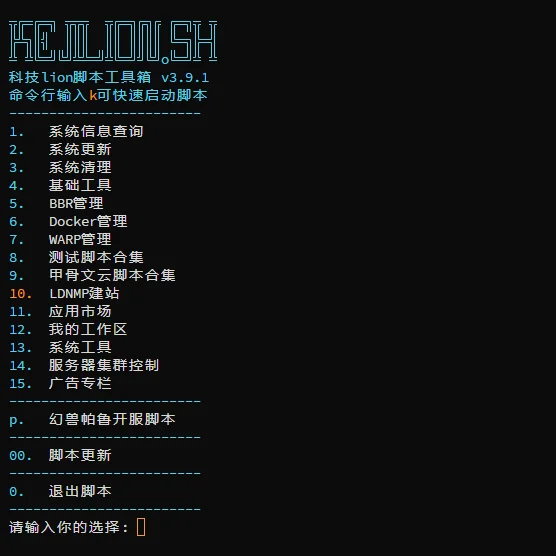
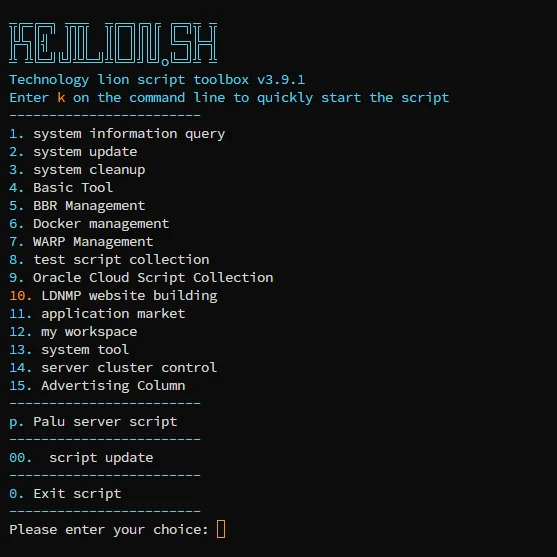
📦 核心功能 (Core Features)
-
系统信息概览:快速展示 CPU、内存、磁盘、带宽等运行状态
System status overview: CPU, memory, disk, bandwidth and more -
网络测试工具:集成测速、回程、延迟、丢包检测等
Network tools: speed test, route trace, latency, packet loss test -
Docker 容器管理:独家容器可视化 + 容器控制增强命令
*Advanced
```
项目信息
| 项目 | 值 |
|---|---|
| 仓库 | kejilion/sh |
| 语言 | Shell |
| Star | 2,878 |
| Fork | 955 |
| 主页 | https://kejilion.sh |
参考链接

163
文章数
72
分类数
1
评论数
3406
访问量
文章目录
评论